Everything your fractional CFO practice runs on, in one system.
Alpyne is the financial operating system for fractional, outsourced and advisory CFO practices. Win the client, connect their books, close the month, build the model, deliver it under your own brand — and move data between their systems while you do it. One login, one place every client's numbers live, one AI that can see all of it.
14-day trial · Cancel before it ends and nothing is charged · No demo gate
Six layers, one system.
Most practices assemble this out of four tools and a spreadsheet, and spend the month moving data between them. Here each layer reads from the one beneath it. That stack is what a financial operating system actually is: not another reporting tool sitting on top of the books, but the data, the ledger, the reporting, the forecast and the firm itself in one place.
- 01Data
- One-click connections to every client’s accounting, billing and commerce systems, with the chart of accounts normalized so clients are comparable. Flows move data between those systems too — Stripe, Shopify and Salesforce activity landing in QuickBooks or Xero on a schedule, instead of someone keying it in.
- 02Accounting
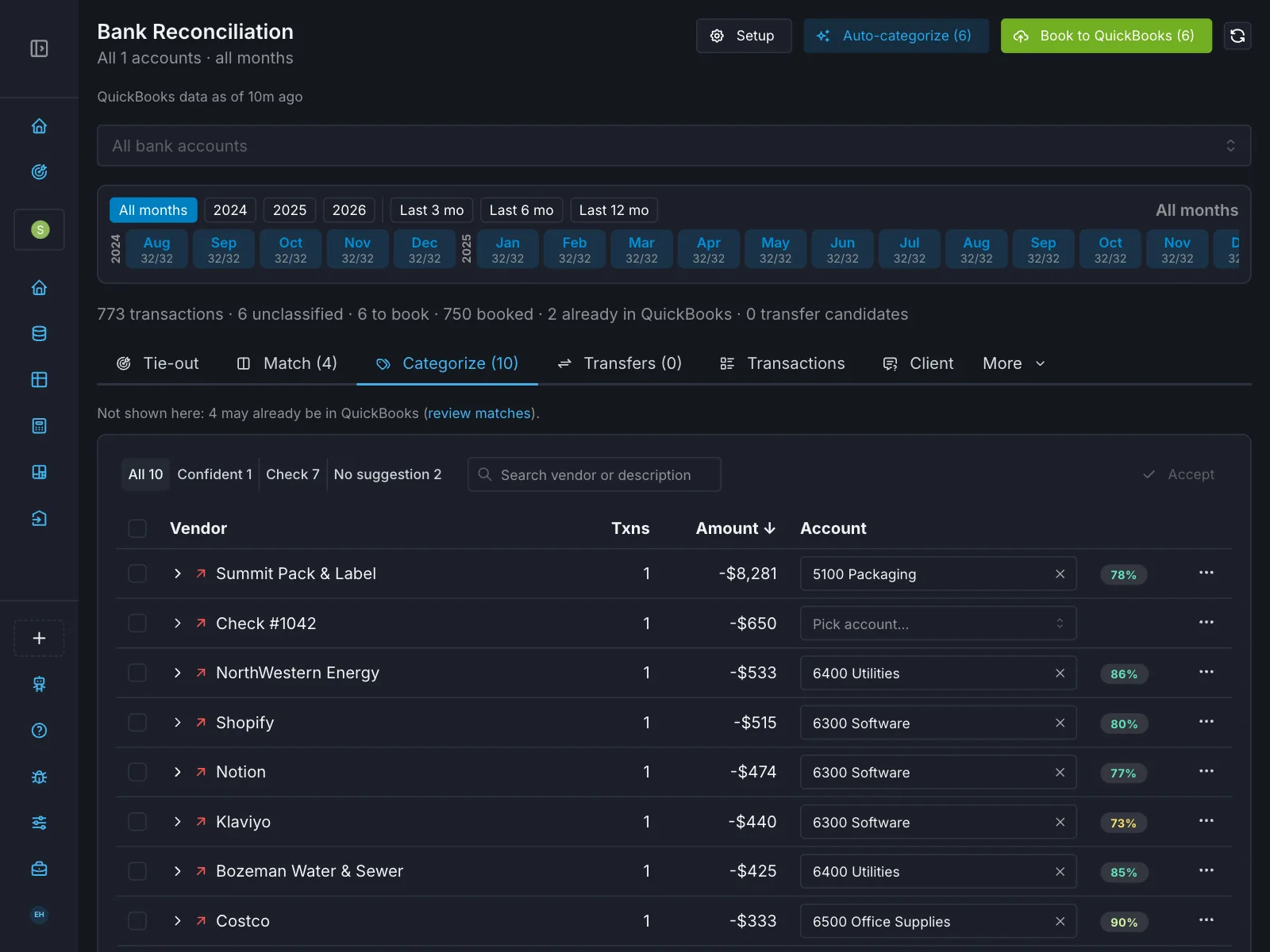
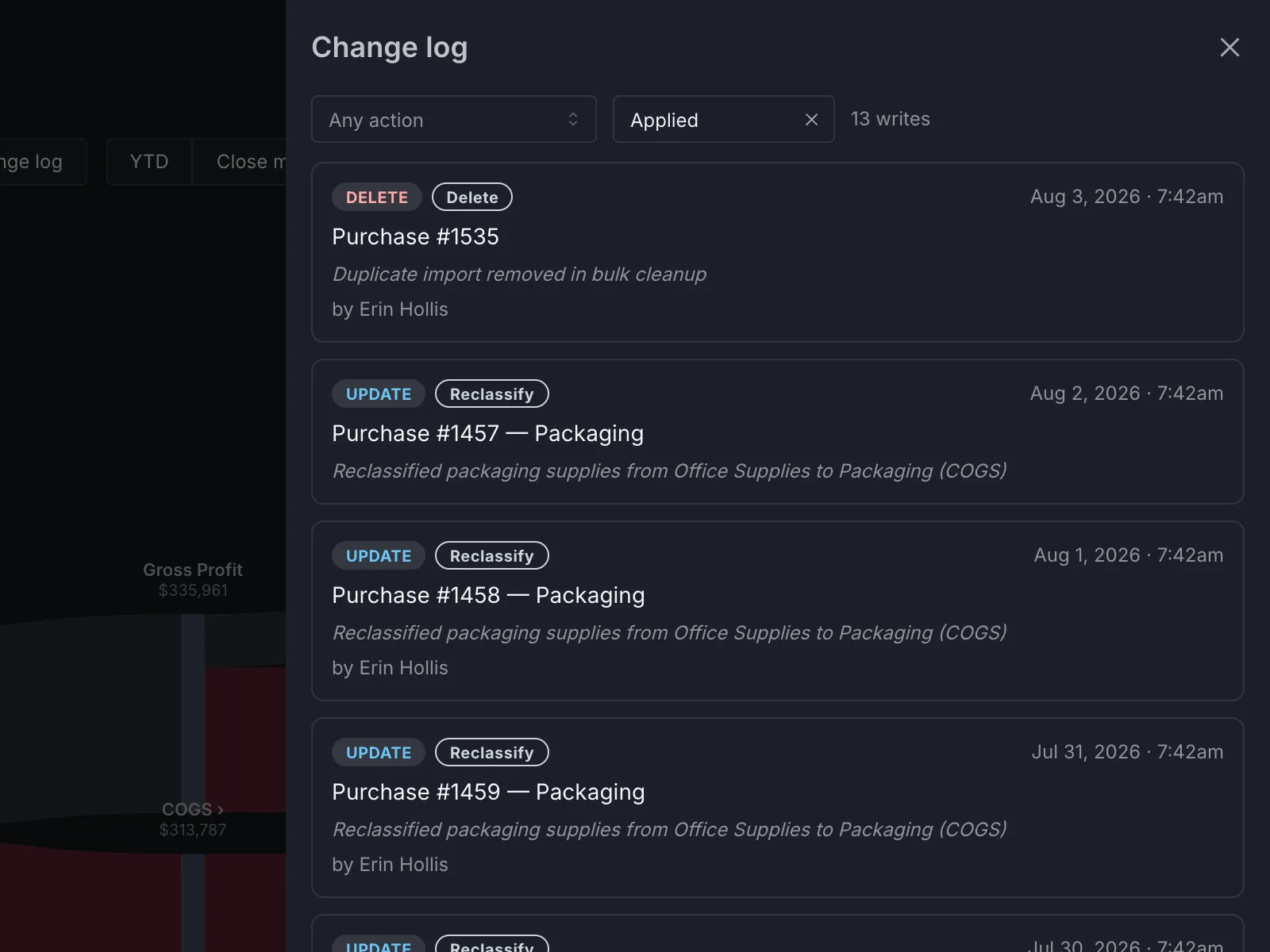
- The ledger itself, not a layer above it. Reconciliation, AI-suggested categorizations and reclassifications, journal entries — written back to QuickBooks and Xero when you approve them, with a change log of what was written and by whom.
- 03Reporting
- Fully white-labeled dashboards and monthly packages that update from live data rather than being rebuilt each cycle.
- 04Forecasting
- Three-statement models, rolling thirteen-week cash forecasts and driver-based models wired to the ledger, not to a snapshot someone pasted in. Budget versus actual with the variance already calculated.
- 05Intelligence
- Sherpa reads the full context of a client — the engagement, the ledger and the model at once — tracking variances and surfacing margin leakage across the whole book. Or bring your own: Alpyne ships an MCP server, so Claude, ChatGPT or any MCP client can work against the same data, inside the same permissions.
- 06Practice
- The firm layer: pipeline, AI-drafted engagement letters and e-signature, client billing, your team and who is assigned to which client, and deliverables that look the same across every engagement.
It writes back. With a trail.
Every FP&A platform reads the ledger and stops there. Alpyne categorizes, reclassifies and posts — you approve first, and every write is recorded.
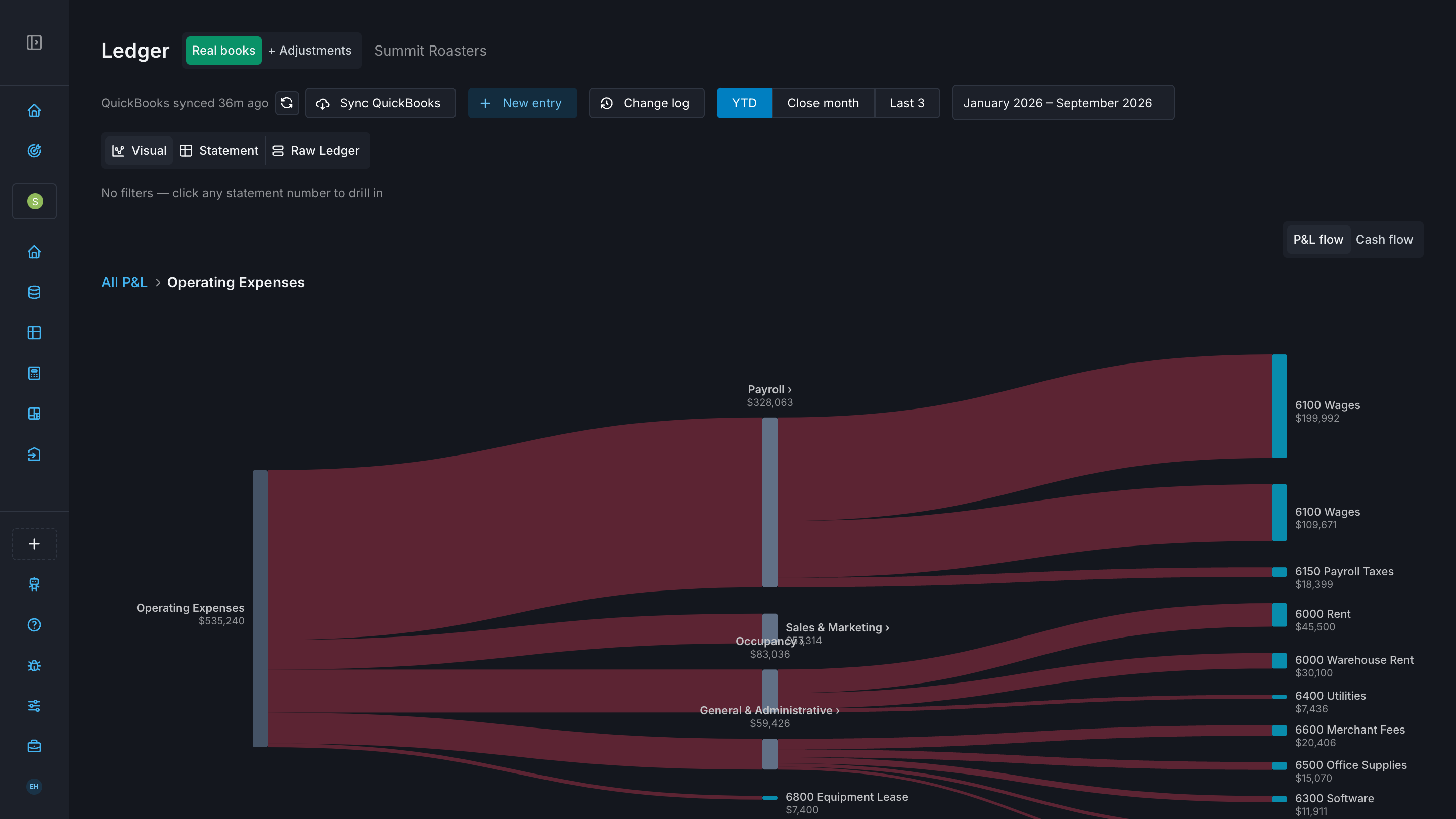
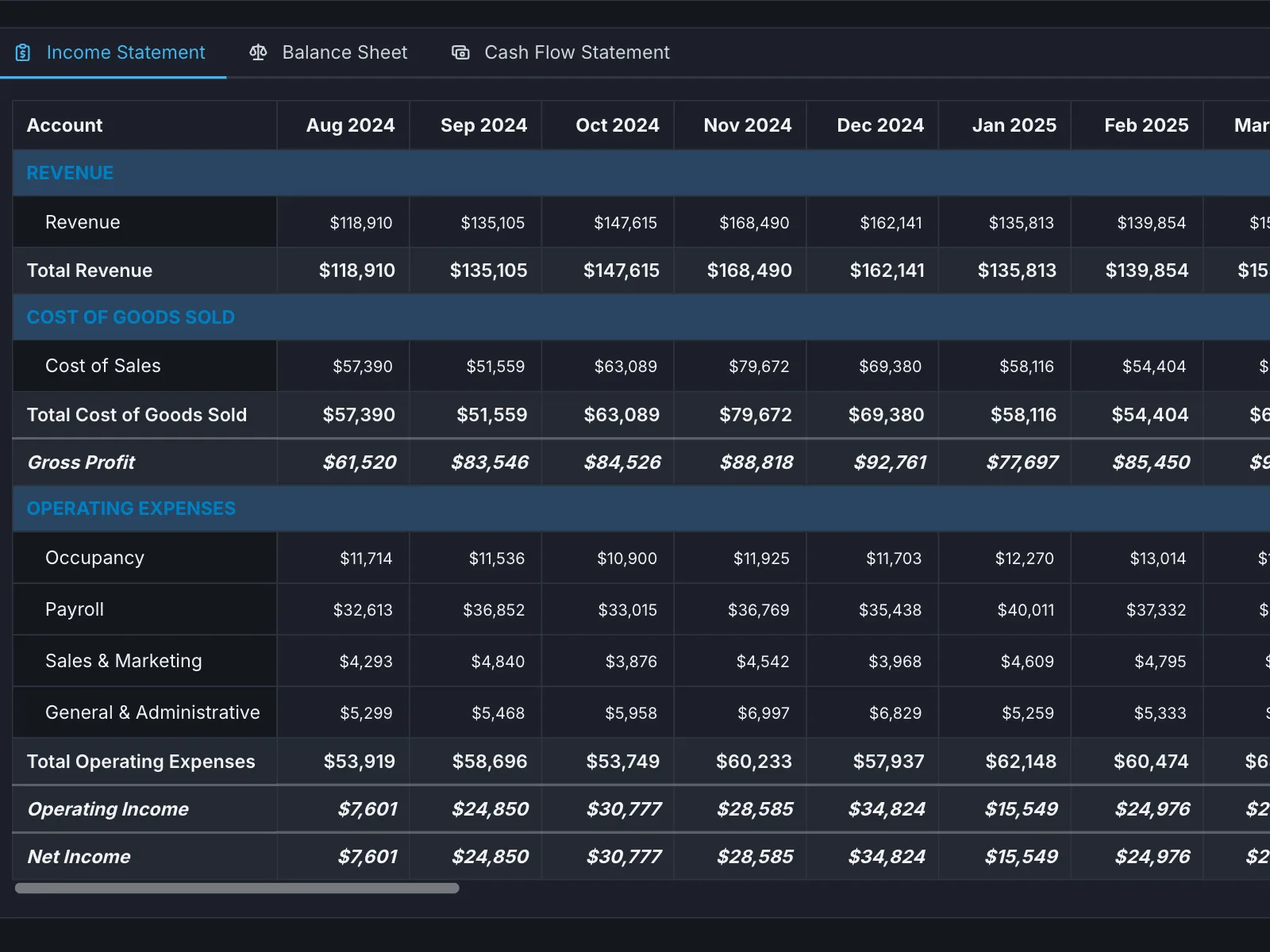
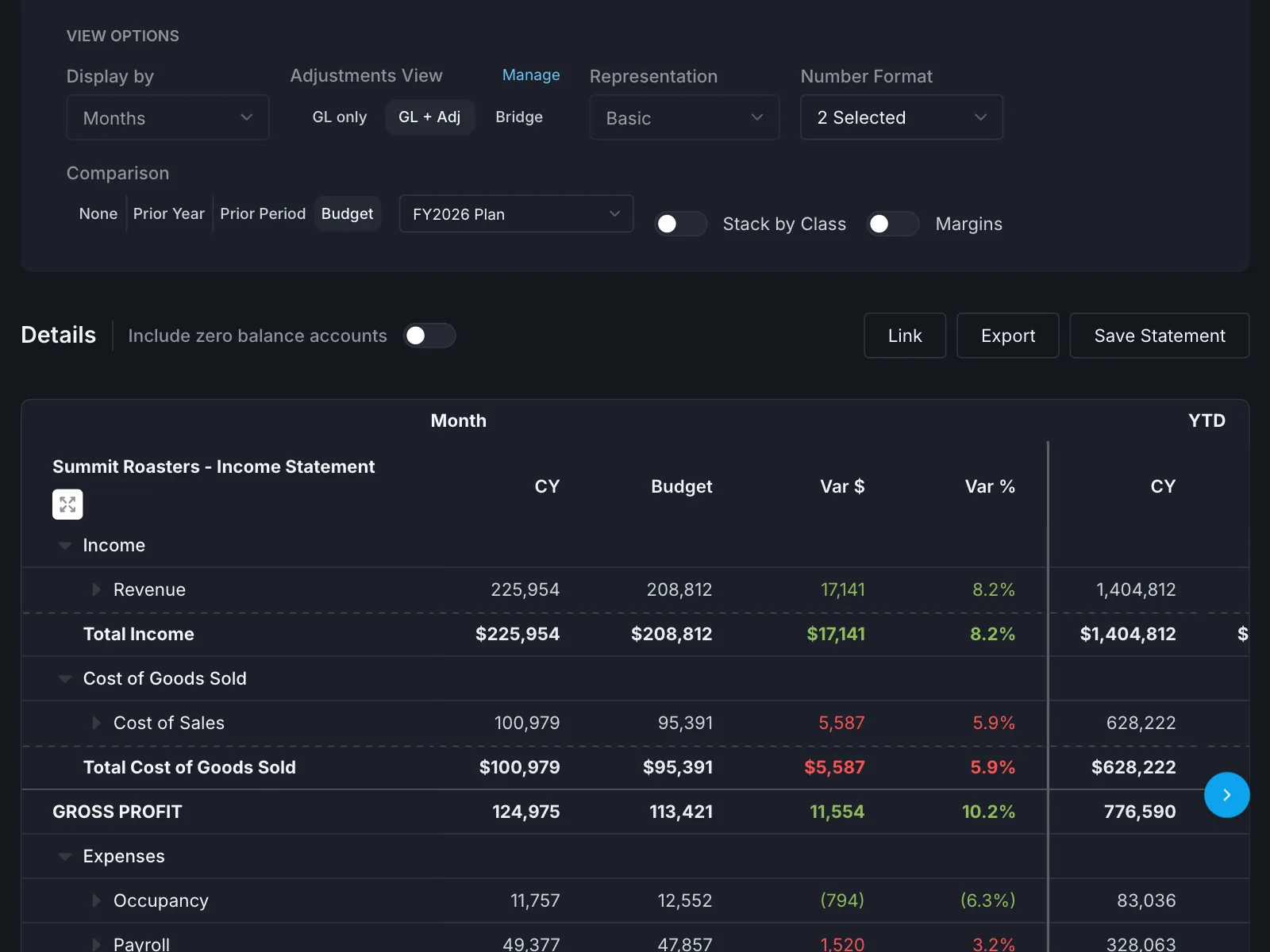
Three statements, and what moved.
A full income statement, balance sheet and cash flow statement off conformed data — then the same view against budget, with the variance calculated.
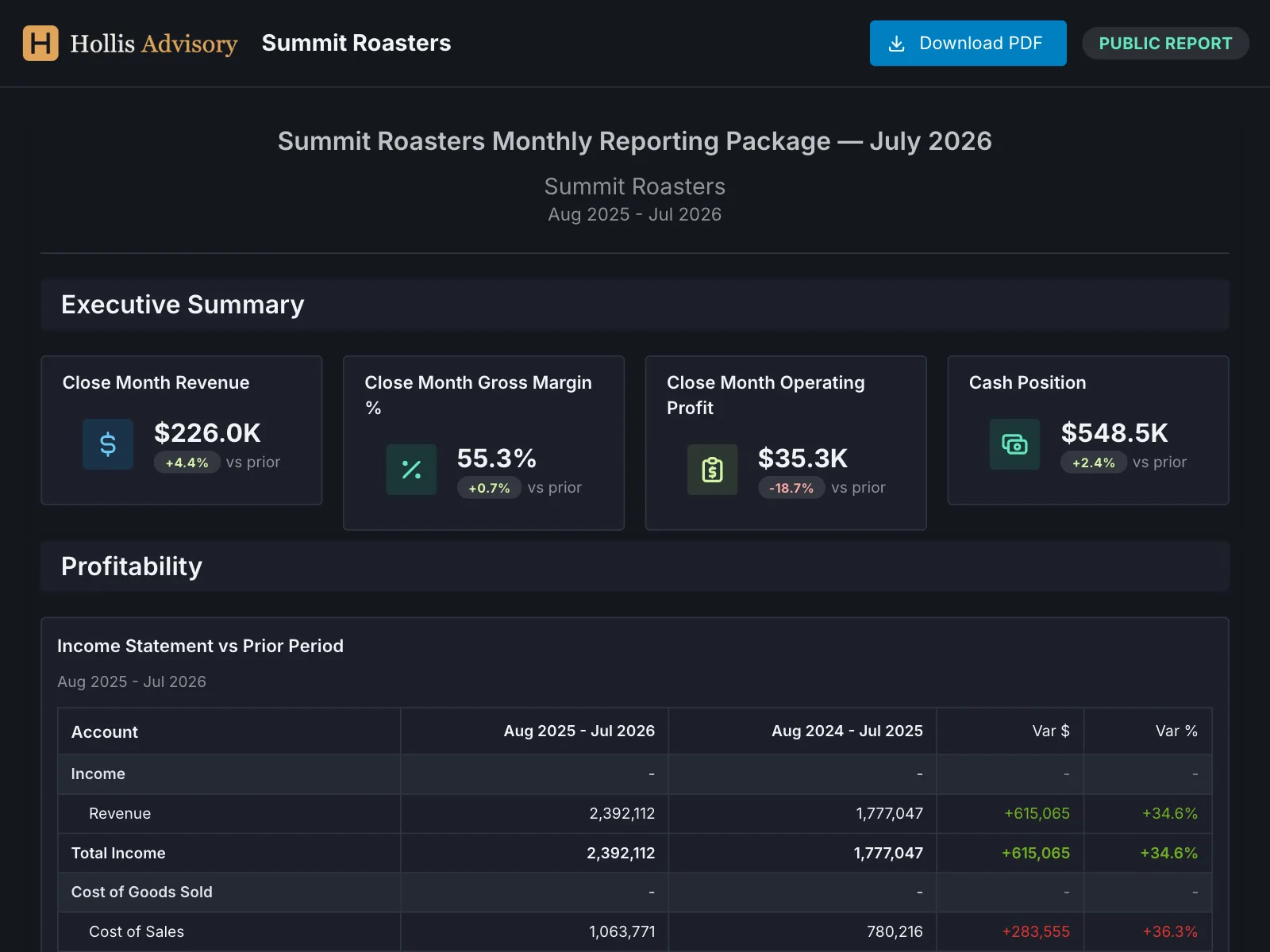
Full white label. Your brand, not ours.
Not a logo swap in a corner — full white labelling. Your firm’s name, mark and colours on the client dashboard, the monthly reporting package and the exported PDF, delivered on your own subdomain. Your client never sees the word Alpyne, and never needs to know the engagement runs on it.
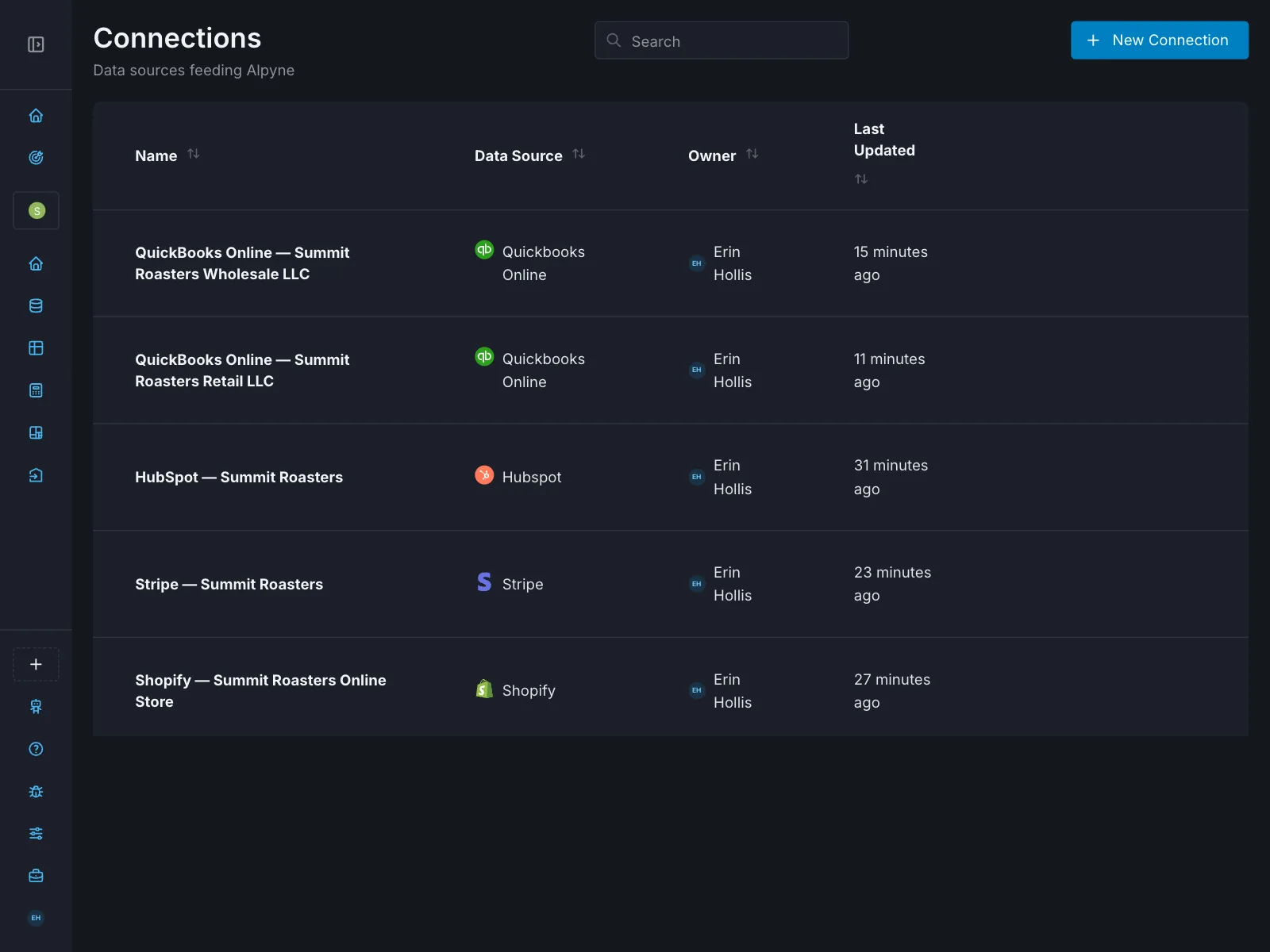
One click to the systems your clients already run.
Nobody migrates. Alpyne connects to what is already there and normalizes across it, which is the part that makes a book of clients comparable.
It also moves data between those systems. Stripe, Shopify and Salesforce activity can be posted into QuickBooks or Xero on a schedule, so the revenue side of the ledger stops being a monthly re-keying exercise. An FP&A tool reads a ledger; this writes to one.
- QuickBooks Online
- QuickBooks Desktop
- Xero
- NetSuite
- Sage Intacct
- Zoho
- COUNT
- Stripe
- Shopify
- Chargebee
- Salesforce
- HubSpot
- Copper
- Google Analytics
- Google Ads
- Plaid
Read-only — transactions, balances and asset reports. Read-only is the point: the bank feed is evidence, and nothing writes back to it.
- Spreadsheet sync
- MCP
Anything we do not connect to, you can still bring. Push it in through a synced workbook, or wire your own source over MCP.
Your model is current on the first of the month. Without you.
Most models do not die of bad assumptions. They die of maintenance — the monthly ritual of exporting the trial balance, pasting it into the actuals tab, repairing whatever moved and re-checking the formulas, all before any actual thinking happens. Do that across nine clients and the model quietly becomes a thing you rebuild rather than a thing you use.
Alpyne wires the model to the ledger so that step is simply gone, and then does the structural work around it too.
- Actuals update themselves, every month
- No exporting a trial balance, pasting it into the actuals tab, fixing the rows that moved and re-checking the formulas before you can even start looking at it. The model is wired to the ledger, so the month closes and the model is already current. This is the single thing that stops a model going stale in month three.
- Hybrid, and that is the point
- The model lives in Alpyne and your workbook lives alongside it, reading and writing both ways. You are not asked to abandon a model that already works, and you are not stuck maintaining it by hand either. Best of both, rather than a choice between them.
- Model an element by hand, or let the system do it
- Per element, not per model. Drive revenue off a library of model patterns and build the one weird client-specific schedule yourself — or the reverse. The parts you care about stay yours; the parts you do not get handled.
- The structure comes free
- You do not build the three statements, the roll-forwards or the summaries. The system assembles them from the elements, so the work is the assumptions rather than the plumbing that connects them.
- Output flows across the platform
- The model reads out continuously, so what it produces is available everywhere else — dashboards, the monthly package, the board deck, Sherpa. A forecast that lives in one file is a forecast nobody else can use.
- Snapshots for scenarios
- Take a snapshot and model the other version: the hire, the raise, the price increase, the downside. Keep them side by side instead of saving six copies of a workbook with the date in the filename.
The practical effect: you spend your time on the four assumptions that actually decide the answer, and none of it on updating actuals or rebuilding a balance sheet that was always going to be a balance sheet. Sherpa can work on the model and the workbook too →
One tool, or four.
A fractional practice usually runs a practice-management tool, a proposals and billing tool, something for the close, and an FP&A platform. Each is good at its own stage. None of them covers the next one, and none of their AIs can see past it.
| What your practice has to do | One Alpyne seat | The four tools it replaces | |||
|---|---|---|---|---|---|
| Capability |  one seat, one login one seat, one login | A practice-management toolKarbon, Canopy | A proposals & billing toolIgnition, Anchor | A close & ledger toolDouble, Uncat, FloQast | An FP&A platformJirav, DataRails, Mosaic |
Data and reportingGet it in, conform it, and get it out under your brand4 components
| ●YesAll four, in one place, under your brand | ◐PartialConnects the firm’s own books, not the client’s; the branded portal carries documents, not financials | ◐PartialBranded proposals on a custom domain; nothing on client reporting | ◐PartialDouble white-labels a client portal on your own subdomain | ●YesBroadest connector lists in the category, strong dashboards, and Jirav white-labels |
ForecastingThree statements, cash, and the variance story4 components
| ●YesBuilt in — and it still syncs to your workbook | ○Not in the productAnalytics measure the firm, not the client | ○Not in the product | ◐PartialFloQast drafts variance explanations; no forecasting | ●YesWhat they are built for, and they are good at it |
Practice managementRunning the firm, not just the client5 components
| ●YesPipeline through to billing | ●YesWhat the category is for, and it is good at it | ●YesProposal to payment, best in class | ◐PartialDouble keeps a client database; no pipeline, proposals or billing | ○Not in the productBuilt for in-house teams; no practice layer at all |
Accounting and automationThe books themselves, and the work of closing them4 components
| ●YesWrite-back, with approval and a change log | ◐PartialCanopy watches the GL and routes exceptions — it flags, it does not fix | ○Not in the productWrites to the firm’s own books, never the client’s | ●YesDouble posts entries, Uncat syncs fixes back, FloQast runs the close | ○Not in the productRead-only by design — the ledger stays the book of record |
AINot whether there is an assistant — what it can reach3 components
| ●YesSees all four rows above at once | ○Not in the productKai and Coworker are scoped to their own data by design | ○Not in the productSees proposals and invoices | ○Not in the productSees the ledger | ○Not in the productSees the model |
| Monthly costOne principal, eight client companies, Advisory level | $713 | $89–139 | ~$148 | $72–200 | $400–1,200 |
Running one of each comes to roughly $837 a month across four contracts, four logins and four places your clients’ numbers live. Alpyne is $713, in one. The $124 is not the point — the row above it is.
FloQast, Mosaic and DataRails do not publish prices. Jirav does, at $50–150 per client per month, and is the only one of the four built for a multi-client practice. Scored against each vendor’s own published material, October 2026. Where a category does something better than Alpyne does, it is marked as such.● in the product◐ partly○ not in the product
Comparing against one product rather than a category? Alpyne vs Jirav, Alpyne vs DataRails, or a Mosaic alternative after the HiBob acquisition. Each one concedes what the other tool does better.
Not a horizontal FP&A tool with a “fractional” tab.
The FP&A platforms were built for one in-house finance team and then used across clients by advisors who had no better option. Everything that makes a practice different — conforming charts of accounts across clients, moving between them without re-authenticating, pricing that falls as you add clients instead of rising — is an afterthought in that design, because it was never the design. Jirav is the honourable exception and has a real partner programme; it still models each client on its own, with no view across the book.
Alpyne starts from the practice. Fractional CFOs, outsourced accounting firms and advisory practices are what the product is shaped around.
An in-house finance team running a single company can use the same platform, and the Inside plan is priced for exactly that. It is a supported case — just not the one the product was designed around.
What's in place, and what isn't.
You are putting your clients' financial data somewhere. You should get a straight answer about it rather than a badge.
- Multi-tenant data isolation
- One firm’s client data is isolated from every other firm’s.
- AES-256 at rest
- Data is encrypted where it is stored.
- TLS 1.3 in transit
- Data is encrypted on the way there and back.
- Role-based access control
- Your team members see the clients they are assigned to.
- Audit logging
- Access and changes are recorded.
Alpyne is not SOC 2 certified. Plenty of vendors at this stage describe themselves as “SOC 2 aligned”, which means they have not been audited. If a client of yours requires a certified vendor, that is a real constraint and worth raising before you start a trial rather than after.
Read the full security overviewHow the AI is wired, and what it won't doThe things practitioners ask first.
What is fractional CFO software?
Software built for an advisor who runs finance for several companies at once, rather than for one in-house team. The distinction is structural rather than cosmetic. A fractional CFO needs every client’s chart of accounts conformed to a common shape so clients are comparable, one login instead of twelve, pricing that scales with the number of clients, and a practice layer for proposals, billing and team assignment. Conventional FP&A tools are built for a single company and do none of that.
What is a financial operating system?
A single system that runs the whole finance function instead of one slice of it: the data layer that connects the source systems, the ledger itself, the reporting, the forecasting, and the administration of the work. Most finance stacks are a reporting tool sitting on top of books kept somewhere else, with a person moving data between them every month. A financial operating system removes that step by making the layers read from each other. For a fractional CFO practice it also has to work across a book of clients rather than one company.
Is this built for a practice, or for one company?
For a practice. Multi-client is the design centre, not a feature bolted onto a single-company tool: the chart of accounts normalization, the per-client seat model and the practice-management layer all assume a book of clients. An in-house finance team running one company can use it, and the Inside plan is priced for exactly that — it is simply not what the product was shaped around.
How is this different from Mosaic, Jirav or DataRails?
Those are FP&A tools built for one in-house finance team, then used across several clients by advisors who had no better option. The difference shows up in the places that matter to a practice: conforming charts of accounts across clients, switching between clients without re-authenticating, and pricing that falls as you add clients rather than rising. Jirav is the closest of the three and the comparison page says so plainly; Mosaic was acquired by HiBob in February 2025.
Do I have to move my clients off their accounting system?
No. The platform connects to what they already run — QuickBooks, Xero, NetSuite, Zoho — and normalizes across them. Nobody migrates.
What happens to my spreadsheets?
They keep working. Two-way sync means the workbook logic you have built stays in the workbook; what stops is hand-keying the data into it every month.
Are you SOC 2 certified?
No. Alpyne is not SOC 2 certified, and we would rather say so than describe ourselves as "aligned" with a standard we have not been audited against. The controls that are in place are listed above. If your client requires a certified vendor, that is a real constraint and worth raising before you start a trial.
What does it cost?
Per client, at one of three levels: Reporting at $49, Advisory at $99, Full-stack at $199 a month, with 10% off the whole bill at 5 clients and 20% at 10. Every figure is published on the pricing page; there is no demo gate.
Connect one client and see.
The fastest way to judge this is to point it at a real client's books and watch what comes back. 14 days, and cancelling before the trial ends charges nothing.
Start a 14-day trial